Parallel Port Connection
Workstation end Printer end
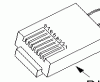
In some rare cases, the
smaller IEEE 1284 C
version may be found here.The parallel interface is defined by the IEEE 1284 specification. Unfortunatly IEEE 1284 cables are not all equal. There are IEEE 1284 compatible cables (worst) IEEE 1284 compliant cables (better) and IEEE 1284 - 1994 compliant cables (best).
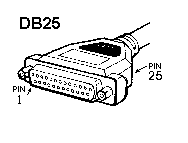
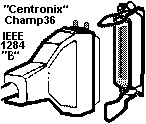
At the computer or host end, a DB25 connector is used. At the printer or peripheral end the connector is a centronix or IEEE B connector which is easy to identify by its large size and wire latch system.
Network Connection
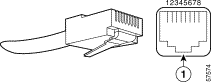
Printer end Most common network cables are CAT 5 wires with RJ-45 connectors. The connector looks most like a telephone cord but it is a little wider and has more contacts.
Note: "connected to the network" does not mean "connected via the network". Many devices, especially printers, can be connected by a parallel cable to a local workstation and still be used by other workstations over the network. The only way to know how the unit is connected is to physically look at the connector at the back of the printer.
Also:
See also:
| file: /Techref/cables.htm, 3KB, , updated: 2018/10/11 16:00, local time: 2024/7/26 17:04,
18.117.104.56:LOG IN
|
| ©2024 These pages are served without commercial sponsorship. (No popup ads, etc...).Bandwidth abuse increases hosting cost forcing sponsorship or shutdown. This server aggressively defends against automated copying for any reason including offline viewing, duplication, etc... Please respect this requirement and DO NOT RIP THIS SITE. Questions? <A HREF="http://piclist.com/techref/cables.htm"> Cables</A> |
| Did you find what you needed? |
|
PICList 2024 contributors:
o List host: MIT, Site host massmind.org, Top posters @none found - Page Editors: James Newton, David Cary, and YOU! * Roman Black of Black Robotics donates from sales of Linistep stepper controller kits. * Ashley Roll of Digital Nemesis donates from sales of RCL-1 RS232 to TTL converters. * Monthly Subscribers: Gregg Rew. on-going support is MOST appreciated! * Contributors: Richard Seriani, Sr. |
Welcome to piclist.com! |
.