This page details the use of Epson^ InkJet printers with pigment based inks to feed and directly print resist patterns to copper clad printed circuit board stock, ready for etching. Once you can feed the PCB through the printer for etch resist, you can then feed it back through the printer for solder mask (yes! Several people report that it works quite well!) and for a component "silk-screen".
Toner transfer is probably easier to set up for and may be as fast, but direct ink is more precise, allows solder mask and component printing in the appropriate color, and most importantly, finer traces and spaces! And if you admit that a laminator is required for TT, given the prices for old C84^ or R220^ / R280^ printers and the Inks, direct to PCB InkJet printing is cheaper. Photoresist systems do allow finer boards, but equipement and materials costs, as well as time are substantial.
The secret (discovered by Volkan) is that certain pigment based inks, such as MISPRO Inks^ (#MISPRO42-SET-MK) can be cured with heat to form a very strong resist. The Epson InkJet printer use pizeo electric actuators in the print head (rather than the thermal method used by other brands) which allows for a wider range of ink types to be squirted out. The "Durabright" inks include a pigment rather than dye. The solid base in pigment inks apparently provides a resistant cover that will actually stand up to the echant after it is melted onto the board. For more, see: http://inkcityusa.com/epson_durabrite_inks.htm
Barry Cooper^ reports^ that Epson ultra chrome k3 ink in his Epson R2400 printer also resists etchant if fully cured. Also, the R2400 can print on flat stock so no modification of the printer is required.
Even without an inkjet ink that will stand up to echant, you can print with an inkjet and then dust the wet ink with toner in a hybrid of inkjet and toner transfer.
This guide was written by Stefan Trethan and edited with comments added from Volkan Sahin (Volkan not Volan, Voltan, Votan, etc...) who first developed and shared this method on the Homebrew PCB Yahoo Group^. A new group InkJet PCB Construction^ has been formed for more specific discussion.
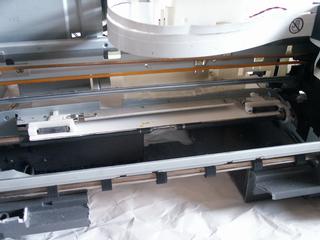
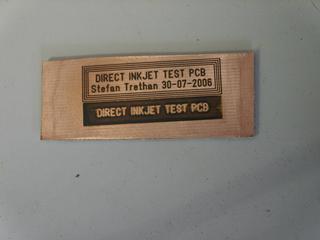
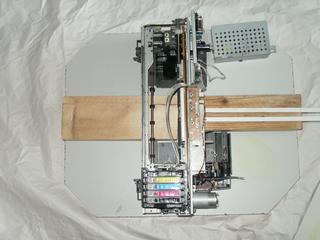
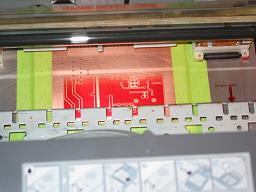
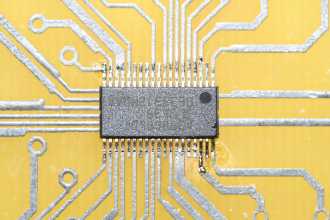
These pictures show a typical modified printer, a PCB blank being printed, and the sort of results some people are getting. That is a TSSOP chip!
Barry Cooper^ reports^ that Epson R2400 (replaced by the R2880) can print on flat stock so no modification of the printer is required. It uses ultra chrome k3 ink which resists etchant if fully cured. Barry says:
"I am currently using 1/16" [PCB stock]. I made a carrier from a for sale sign and a sheet of the colored plastic card that is kept right next to the for sale signs at home depot. The 2 together add up to 1/16 inch. They are plastic and are therefor durable and can be taped to, and the tape removed without damage. I printed on to paper first, then taped the 2 plastic cards together with the paper print on top. Then I cut out the card to the dimensions of the paper and cut the board hole out. Then I pulled of the paper print and taped all 8 edges together, then a piece of paper to the bottom of the card. I am able to drop the board into the hole and it indexes perfectly every time. I use a small piece of tape to hold the top and bottom edge of the board, The carrier fits through the printer with room to spare. My guess is I could go another 1/32 thicker.Last night I printed in black at only 25% density. Dried the board at 275 degrees for 10 mins then re printed at the same density. Flipped the board and did the same for the other side then oven dried the complete board for 30 mins at 275, It is necessary to let the board cool before re printing as at 275 the ink is like a soft plastic. I then etched with acid and had a fantastic result.
Bazza says "Epson R2400 takes a board up to a4 size straight into it. Print in black and white at 50% Then oven dry at 275 for 10 mins. then re print at 50% and re oven dry, perfect results with zero mods required."
CD/DVD printing trays. (make small PCB's with NO modification!) Artisan 50, Stylus RX580, RX595, RX680, R260, R280, R285, R290, R380 don't really need to be modified, just cut out the CD/DVD spindel in the tray so the PCB can lie flat. This allows PCB's up to about 3x5".
For larger PCB's or other printers, modification allows full sized PCB's to be fed as flat stock:
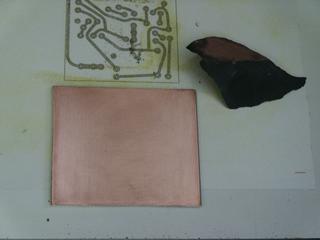 |
Sand the PCB with 600 or 1000 grit paper so that the surface appears scratched everywhere. You may also use a abrasive plastic pad sold for cleaning copper pipes before soldering.
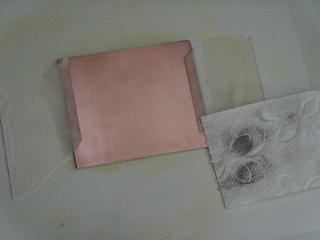 |
Then wipe with acetone, twice, the first pass should take away the copper dust. The PCB must be grease free now and stay that way.
Bora Dikmen says: "...before printing, you should bath the PCB about 1-2 minutes in acid (H-Cl + H2-O2) to become purple-brown in color. This creates a soft surface and ink will be printed very smoothly as if it is printed onto a paper. Otherwise, ink is populated on some areas, waved in color and not evenly distributed on the PCB."
Pre-Treat?
Volkan found that wiping the PCB with DOT 3 brake fluid helped to keep the surface from corroding before it could be printed after cleaning. It was also found by others to help reduce the puddling of the inks.^ Volkan Sahin says "I saw some puddling when the board is not clean enough and to avoid it I used wetting agent. I just did a few tests it worked for me. I used automobile [DOT 3 brake] fluid as a wetting agent. Coat cleaned pcb with very thin film of fluid and wipe it several times completely with paper towel. Set printer to minimum ink amount and then print." Later he found a better treatment: "I found two methods to avoid it one of them was using brake fluid and the other one is coating board with very thin layer of gelatine (unflavored one) before printing. I saw that gelatine is working much better than brake fluid. I used Knox brand. Use 1/2 cup boiling water and one bag (~7grams) of gelatine, let it become cool a little bit and apply it using paper towel on a clean copper clad and dry it. It should be thin layer otherwise during curing it can cause cracks on traces."
John Mardock says "... tried the MIS yellow (MP-4-Y) we have been using with the heated board with good results. I made a series of 5 boards using this yellow from 75C to 105C all with about the same success. The boards are heated in the oven for several minutes to stabilize the temp and then removed and positioned in the printer. I am sure there is heat loss during the process. The great news is this board heating does handle the puddling effect that has been such a pain. The dry time for the ink is just about instantaneous on the heated boards as you might imagine. Seemed the higher the heat the better the coating of the ink. ... The other interesting aspect was one of better resist with less ink being deposited on the board."
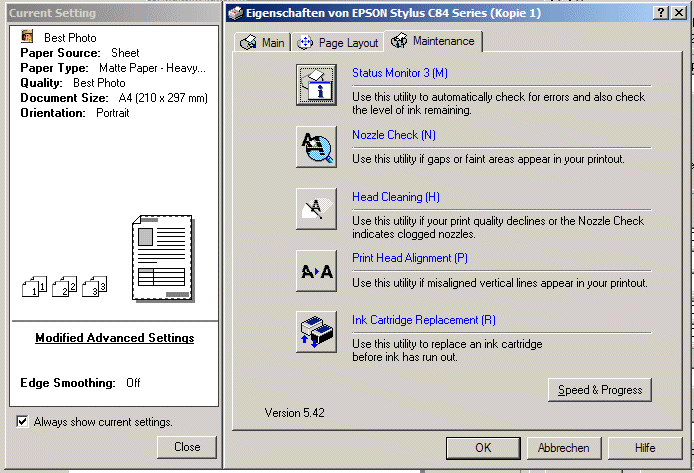
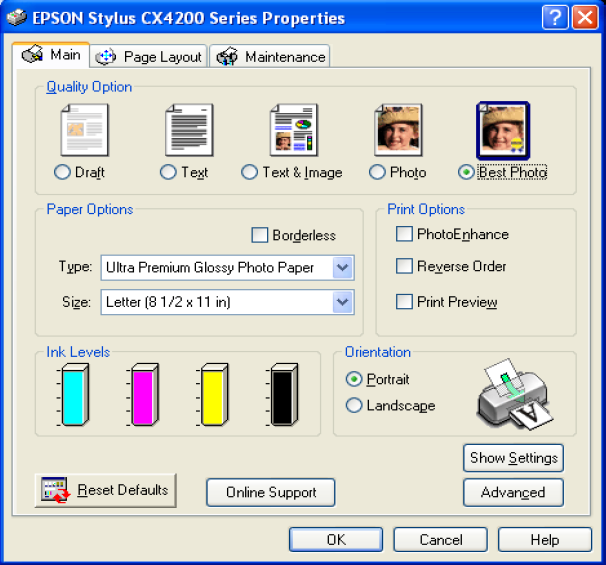
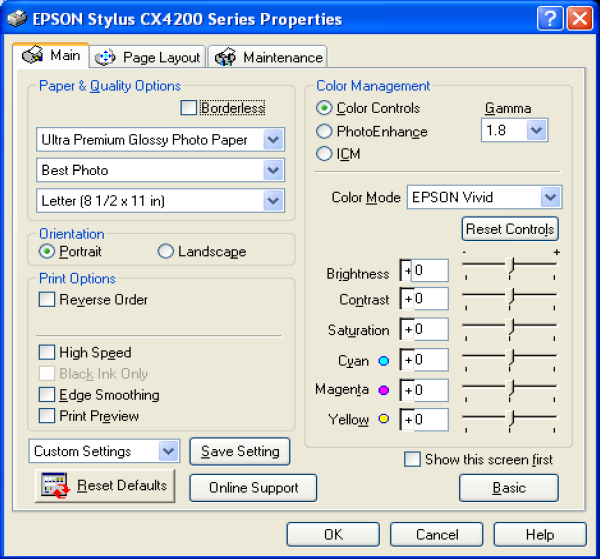
When printing a purely black test pattern I found the transparency setting does not use any ink from the black cart at all. The other settings use ink in varying amounts, the most ink is used for matte paper and the least for glossy or durabright setting. You need Photo or Best Photo resolution. The "fast" setting, which prints in both directions of travel, produces better results for me. No edge smoothing needed.
Some printers / drivers / printing applications will, even when told to print grey or black and white only, mix in colors from all the ink cartridges to make a "mixed" black. This can dilute the special ink if it is only in one cartridge. Most windows printer drivers also increase the width of the printed lines to improve reliability.
The "gutenprint" drivers seem to be able to support finer resolutions of print. They can also avoid mixing ink, and can be modified to print over the hole in a CD Tray. Bob Drings ^ work with this driver is amazing.
http://www.delorie.com/pcb/pbm2escp2.zip DJ Delori wrote a utility to control his Epson Inkjet printer when printing PCB films. This program reads PBM files (you'll need netpbm to convert to this from other formats) and produces a binary ESC/P2 file which can be sent directly to a high resolution color Epson printer (mine is an R280). The only limitation is that it needs at least a 1" margin on the top and bottom to allow for the weave algorithm to accurately cover those parts of the image. +It assumes 2880 DPI resolution, and includes these features:
Bob Dring ^ is working to document the ESC commands that are actually sent to the printer and has written a program^ that decodes, and can modify them to better control cartridge selection.
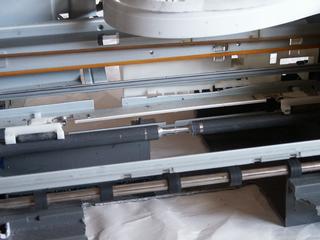
This video shows how to use a modified C87 to print and etch a PCB.
 READY |
When printing, keep in mind that the printers / software may not produce a printout that is /exactly/ the correct size. The traces may be "stretched" or warped in the x or y axis. It's good to have a PCB program that allows fine scaling of the printed size in either dimension. The alignment of the printer can also be adjusted by a competent service tech.
To print you must insert the carrier manually into the printer. Turn the printer on, and wait until it has completed it's dance. Now feed the edge of the carrier into the printer so that it just protrudes a few mm from the traction/pressure rollers. Make sure it is straight so it will not run against an edge when the printer feeds. Now print the artwork on your carrier to find the right position (stick some tape or adhesive backed plastic foil on it or you may end up with permanent marking of the carrier). You can use low resolution for this print since you only need to know where it will end up. If you use the fastest draft setting watch out, the printer virtually shoots it through.
Now place the PCB over this position and stick it down with tape along the edges (take care not to cover any holes, the printer may look for those for alignment) or using double sided tape underneath. You may delay the acetone cleaning of the PCB until this point if you prefer. Again feed the carrier and print the artwork.

Using a Printer with a CD printing tray:
One method of feeding a PCB that requires no printer modification is to use a printer that can print on CD's. The down side is that the print area is very limited, as the printer, and driver, will refuse to print over the area of the CD hole. PCBs sizes are limted to an inch or two on a side.
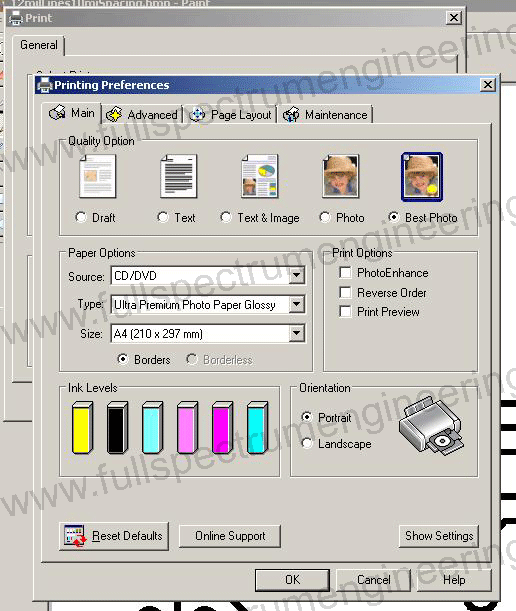
fullspectrumengineering sells a template that fits in a CD tray and holds small PCB blanks which they also supply, pre-cut to size. Customer reviews have not been positive. ^
jai_mann says:
It won't work with a Brother MFC-J870DW http://www.brother-usa.com/MFC/ModelDetail/4/MFCJ870dw/Overview printer. It consistently "jammed" while the printer was performing optical sensing.I then made my own template from acrylic which is the same thickness as cds. What a PITA. This thing jammed later in the optical sensing than the FSE one which crushed my hopes.
I just tested a general RW cd after having read your post and sure enough the cursed thing worked. The cd wasn't intended for printing so the ink didn't come out well but it performed the entire operation and ejected the tray.
Considering how cheap CD's are, and how easy they are to cut to your desired PCB size, we strongly recomend you make your own template / holder.
If you choose to try the hybrid ink/toner method, dust the wet ink with laser toner or embossing powder at this point.
 START |
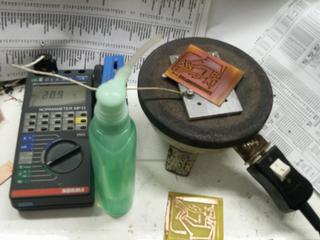
This is a key step. The PCB and ink must be heated to a specific temperature to cure it and keep it from coming off in the etchant. To do this, a stove or heat gun will not allow the required temperature control. Something more precise must be used: Basically an old electric hot plate with a aluminum plate on top and a temperature meter attached.
For MISPRO Inks: It turns out that around 446F / 230C is the sweet spot. keep that for several minutes (at least 3 i'd say for now but more research needed). This incidentally is exactly the point where the copper will start to go from just minimal yellowish oxidation to a purple one (This is probably what Volkan is using to judge the temperature). It is well away from damaging the PCB.If you are much below or above this temperature the ink will not resist so well. Round about 225C the ink starts to change somehow and can no longer be cleaned off, even with acetone.
For Hybrid Ink/Toner: Use the temperature at which the toner or embossing powder melts. It will be very easy to see, as the powder will suddenly become shiny.
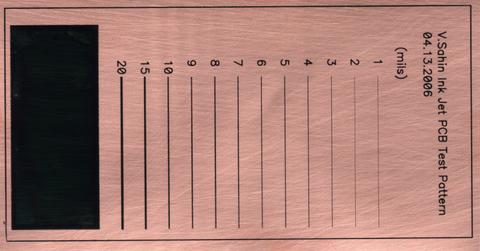
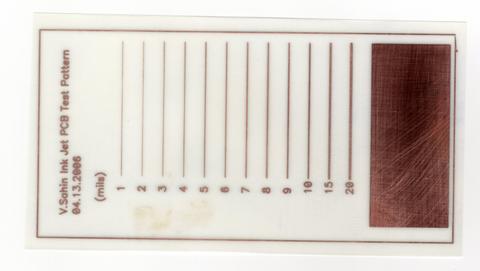
I suspected Ferric chloride is less aggressive to the [MSPRO] ink than CuCl, so i set up a test. I cut a test PCB in half after curing to get identical samples, and put one in CuCl and one in ferric chloride. If anything the ferric chloride showed more aggressive under-etching. In the samples below, the lines above 3 mills are fine; below 3 they are unreliable.
scc_11067 says: "[using Durabright inks] ... I switched to ferric chloride and get really good results. I am currently using durabrite yellow with really good etch's Could use durabrite magenta, but the ink bunches up on the board if not dried instantly. The persulfates just lift the ink off the board."
See also:
http://www.polaco.pro.br/pcb-epson I have made the same with an Epson Stylus Color C43UX, but after the print finished, I've powded Laserjet toner on the PCB. So I wiped the excess from the board and heated it. The toner melted and fixed on the board. The corrosion is perfect, and the results where impressive.
Questions:
Hi, this is pretty impressive but have you ever tried using a laser printer instead of an inkjet printer? I'd love to see you take an inexpensive laser printer and mod it for directly printing PCBs. Thanks.
James Newton of MassMind replies: See Direct Laser Print+
Has anyone tried to construct a small infrared heater to place directly behind the print carriage to heat the board as it goes into the print stage? It certainly would provide a uniform temperature from start to finish.
James Newton of Massmind replies: The heat required to "fix" the ink would melt the printer, but a slight heat might help the ink adhere to the copper initially. I would think this would not be worth the effort, but I could be wrong.+
Has anyone tried using Brasso or similar polishing compound to remove oxidation from the boards before print? I realize that the board would then have to have the polishing compound residue cleaned off before printing but it would leave a smooth uniform print surface.
Has anyone tried the MisPro Heat Transferable inks designed for ironing into T-shirts? If so, have you gotten a noticeable difference in etch resistibility from it either from direct print or from printing/transferring?
James Newton of Massmind replies: I believe they have been tried and did not resist etching, but I can't find the reference in the group now, so I could be wrong. It's worth trying again anyway.+
1) if i have FeCl3 powder then what should be the proportion of it with water for proper etching of any type of PCB?
2) what should be added in etching solution to increase etching speed?
James Newton of Massmind replies: 1) That depends on the powder. Follow the directions from the company that made the powder, or use trial and error. 2) Heat, agitation, or mild scrubbing.+
I'm trying to set this up using a cannon bjc-240.
I think I can just dremel the sheet feeder into a wider opening.
It only cost a dollar at a yard sale.
I was wondering if your could heat the boards before printing to make the ink stick better.Also, what other inks could be used.
My wife refilled a cartridge with india ink .It worked for a while but I think it dryed up in a couple days.
Have you tried using the ink as soldermask? I did, but unfortunately the results were not that good, as the ink did not managed to stop the solder.
How did you do it? Different ink?
James Newton replies: I haven't personally done it, but I believe the key is heat curing the ink prior to soldering.+
volkan bey ben soner
ankaradan
sizinki gibi bi yazýcýyý tekrar bozup yapmak istiyorum
malzemelerini hazýraltoyýrum
a4 yazýcýnýn yazcýný kafasýnýn gidip gelme alanýný büyütmek istiyorum. tüm donanýmlarýný hazýrlasam þerit de dahil. bi problem çýkarmý ?
Comments:
hi, iam reading this awesome info. and i dont stand, what are you mean, with ""spindel in the tray"", i dont speak english very good, but i gona buy any of printers you named in top, so i do many pcb, and some large. well, sorry for the english, please let me know, what is ""spindel in the tray"", thanks best regards, from Mexico
James Newton of MassMind replies: The part of the tray that holds the CD by sticking up through the hole in the center of the CD.+
Code:
| file: /Techref/pcb/etch/directinkjetresist.htm, 47KB, , updated: 2022/5/17 14:12, local time: 2024/8/14 08:40,
52.14.114.210:LOG IN
|
| ©2024 These pages are served without commercial sponsorship. (No popup ads, etc...).Bandwidth abuse increases hosting cost forcing sponsorship or shutdown. This server aggressively defends against automated copying for any reason including offline viewing, duplication, etc... Please respect this requirement and DO NOT RIP THIS SITE. Questions? <A HREF="http://piclist.com/techref/pcb/etch/directinkjetresist.htm"> InkJet,PCB Etch,Etch PCB, Etchant Resist</A> |
| Did you find what you needed? |
|
PICList 2024 contributors:
o List host: MIT, Site host massmind.org, Top posters @none found - Page Editors: James Newton, David Cary, and YOU! * Roman Black of Black Robotics donates from sales of Linistep stepper controller kits. * Ashley Roll of Digital Nemesis donates from sales of RCL-1 RS232 to TTL converters. * Monthly Subscribers: Gregg Rew. on-going support is MOST appreciated! * Contributors: Richard Seriani, Sr. |
Welcome to piclist.com! |
.